
Prosper offers a direct integration with Tribal Habits through our platform. To set it up, follow the steps in Part 3 of this guide. Since the integration is managed by Prosper, please provide your Tribal Habits URL and API Key to your Customer Success Manager (CSM) for initial setup.
Once connected, this integration will automatically create users in Tribal Habits from Prosper, reducing admin effort and ensuring data consistency.
Additionally, Prosper can activate a 'Login with Prosper' feature in your Tribal Habits portal to allow users to access Tribal Habits with their Prosper login (avoiding the need for separate passwords). See Part 4 for more on setting up social logins.
Part 1: Tribal Habits Learning in Prosper
Once integrated with Tribal Habits, managers can track learning within their team member's profiles—alongside Reviews, Assessments, Development Plans, Goals, Recognition, and Notes & Attachments—providing a complete view of each employee’s performance, growth, and contribution.
Managers can also enroll staff into learning directly from the Learning tab or within the Development Plans tab to ensure timely support and development.
Part 2: Notifications - The Learner's View
When a manager enrolls an employee in learning, Prosper sends SMS notifications directly to the learner’s device, ensuring easy access to content—especially for remote and hybrid workers.
Learners will also receive an email notification for any learning assigned by their manager, providing multiple channels to access and engage with the course.
Accessing learning via either the SMS or email link will take the employee directly to their assigned learning where they can get started
Part 3: Setting up integration with Tribal Habits
Step 1: Provide your Tribal Habits URL to your Prosper CSM
To link your Prosper account with your Tribal Habits portal, please provide your Tribal Habits URL (e.g. yourcompanyname.tribalhabits.com) to your Prosper CSM or email it to support@prosperex.com.au
Step 2: Gain access to your Prosper API key from Tribal Habits portal
You can find your Prosper API key in your Tribal Habits portal by navigating to Admin > Accounts > Integrations. Locate the Prosper integration card and click the API Key link to view your key. (If the API Key link is not visible, please contact Tribal Habits Support and they will assist in adding the key to your portal)
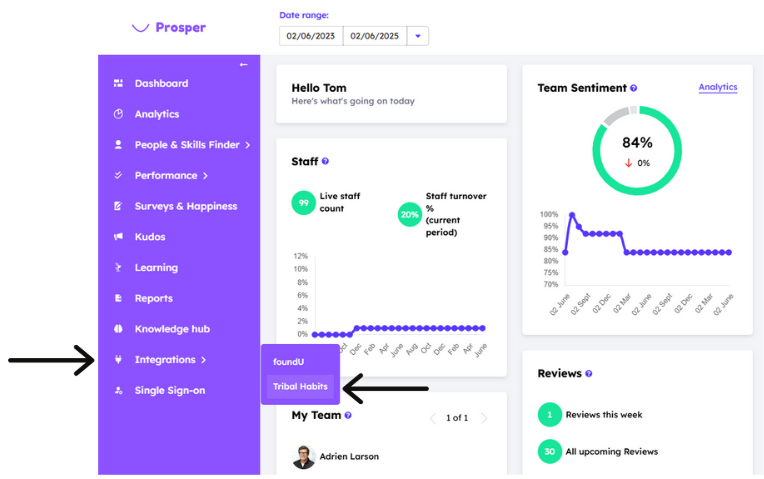
Step 3: Navigate to Integrations in the menu and select Tribal Habits
Comments
0 comments
Please sign in to leave a comment.